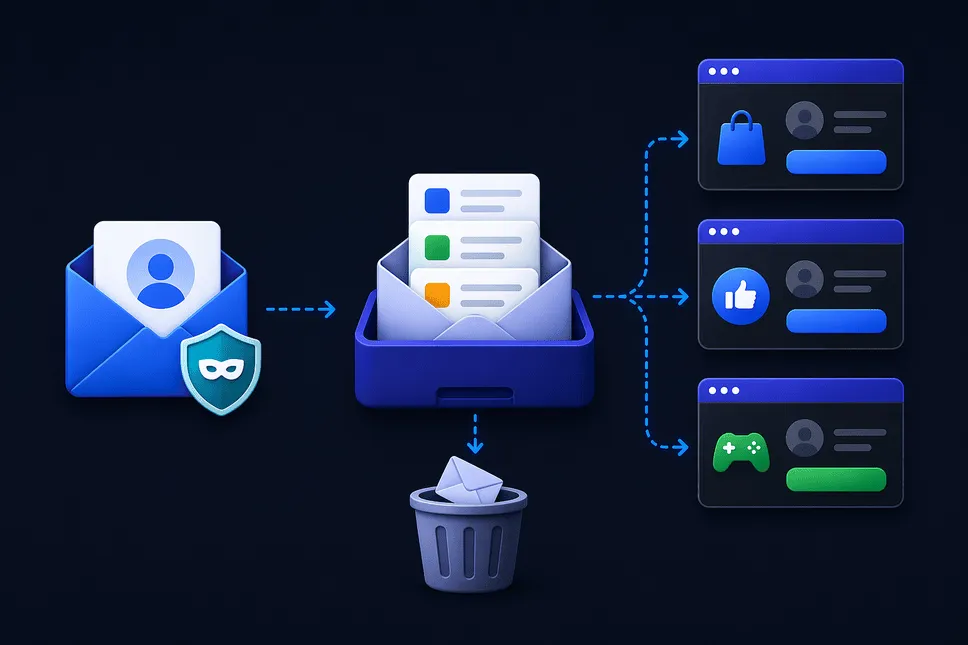
#डिस्पोज़ेबल मेल कैसे काम करता है? अस्थायी ईमेल सिस्टम के लिए एक संपूर्ण मार्गदर्शिका
परिचय
हर बार जब आप किसी वेबसाइट के लिए साइन अप करते हैं, कोई संसाधन डाउनलोड करते हैं, या निःशुल्क परीक्षण का प्रयास करते हैं, तो आपसे एक चीज़ मांगी जाती है - आपका ईमेल पता। पहली बार में यह हानिरहित लगता है, लेकिन समय के साथ, यह आदत स्पैम, प्रचारात्मक ईमेल और कभी-कभी सुरक्षा जोखिमों से भरे इनबॉक्स को भीड़भाड़ की ओर ले जाती है।
आपका प्राथमिक ईमेल, चाहे व्यक्तिगत हो या व्यावसायिक - धीरे-धीरे अवांछित संदेशों के लिए डंपिंग ग्राउंड बन जाता है। इससे भी बुरी बात यह है कि एक बार जब आपका ईमेल साझा किया जाता है, तो इसका उपयोग, भंडारण, या यहां तक कि बेचा जाने के तरीके पर आपका बहुत कम नियंत्रण होता है।
यहीं डिस्पोजेबल मेल आता है।
इस सटीक समस्या को हल करने के लिए एक डिस्पोजेबल मेल डिज़ाइन किया गया है। यह आपको अपना वास्तविक इनबॉक्स उजागर किए बिना ईमेल प्राप्त करने की अनुमति देता है। यदि आप नए हैं, तो गहराई में जाने से पहले यह समझना उचित है डिस्पोजेबल मेल क्या है और यह कैसे काम करता है।
हमारी सेवा अल्पकालिक ईमेल पते बनाती है जो स्वचालित रूप से समाप्त हो जाते हैं - आपकी डिजिटल पहचान को साफ, निजी और सुरक्षित रखते हुए।
लेकिन वास्तव में यह प्रणाली पर्दे के पीछे कैसे काम करती है?
आइए इसे सरल, मानवीय तरीके से तोड़ें।
डिस्पोजेबल मेल कैसे काम करता है (चरण-दर-चरण स्पष्टीकरण)
इसके मूल में, डिस्पोज़ेबल मेल एक सरल विचार पर बनाया गया है: एक कार्यशील ईमेल पता बनाएं जो अस्थायी रूप से मौजूद हो, संदेश प्राप्त करता हो और फिर गायब हो जाता है। त्वरित अवलोकन के लिए, आप यह भी पता लगा सकते हैं कि डिस्पोजेबल ईमेल चरण दर चरण कैसे काम करता है।
लेकिन उस सरलता के पीछे एक स्मार्ट सिस्टम है जो ईमेल रूटिंग, स्टोरेज और डिलीट को कुशलतापूर्वक संभालता है।
1. डिस्पोजेबल ईमेल जनरेटर का उपयोग करके त्वरित ईमेल निर्माण
जब आप थ्रोइनबॉक्स पर जाते हैं, तो सिस्टम आपके लिए तुरंत एक अद्वितीय ईमेल पता बनाने के लिए अस्थायी ईमेल जनरेटर का उपयोग करता है।
यह पता कुछ इस तरह दिख सकता है:
user123@kivoxer.com
इसमें कोई साइनअप, कोई पासवर्ड और किसी व्यक्तिगत जानकारी की आवश्यकता नहीं है।
यदि आप इसी तरह के टूल के बारे में उत्सुक हैं, तो आप मुफ्त रैंडम ईमेल जेनरेटर टूल आज़मा सकते हैं और देख सकते हैं कि त्वरित ईमेल निर्माण कैसे काम करता है।
यह पारंपरिक ईमेल सेवाओं से अलग है. एक स्थायी खाता बनाने के बजाय, आपको बस एक अस्थायी पहचान सौंपी जाती है।
2. अस्थायी ईमेल प्रणाली के माध्यम से ईमेल प्राप्त करना
एक बार जब आपका डिस्पोज़ेबल ईमेल जेनरेट हो जाता है, तो यह एक बैकएंड मेल सर्वर से जुड़ जाता है।
जब कोई आपके अस्थायी पते पर ईमेल भेजता है:
- संदेश मेल सर्वर द्वारा प्राप्त होता है
- वेबसाइट बैकएंड से मेल लाती है
- ईमेल तुरंत आपके अस्थायी इनबॉक्स में प्रदर्शित होता है
यह प्रक्रिया पर्दे के पीछे ईमेल फ़ॉरवर्डिंग कैसे काम करती है से निकटता से संबंधित है।
3. रीयल-टाइम इनबॉक्स डिस्प्ले
जैसे ही कोई ईमेल प्राप्त होता है, वह वास्तविक समय में आपके इनबॉक्स में दिखाई देता है।
आधुनिक डिस्पोज़ेबल मेल सेवाएँ समर्थन:
- एचटीएमएल ईमेल
- संलग्नक
- सत्यापन लिंक
- ओटीपी संदेश
यह उन्हें फोन नंबर के बिना ओटीपी सत्यापन के लिए डिस्पोजेबल ईमेल जैसे कार्यों के लिए एकदम सही बनाता है।
4. अस्थायी भंडारण और स्वचालित विलोपन
पारंपरिक ईमेल के विपरीत, संदेश स्थायी रूप से संग्रहीत नहीं होते हैं।
समाप्ति समय के बाद:
- ईमेल पता हटा दिया गया है
- सभी प्राप्त ईमेल मिटा दिए गए हैं
*कोई पुनर्प्राप्ति संभव नहीं है
यह स्पैम ईमेल से स्थायी रूप से बचने और अपने इनबॉक्स को साफ रखने के सबसे आसान तरीकों में से एक है।
5. डोमेन पूल और एड्रेस रोटेशन
कार्यात्मक बने रहने के लिए, डिस्पोजेबल ईमेल सेवाएँ कई डोमेन बनाए रखती हैं।
उदाहरण के लिए:
*डोमेन1.कॉम *डोमेन2.नेट *डोमेन3.org
रैंडम ईमेल जनरेटर इन डोमेन से पते निर्दिष्ट करता है।
यह क्यों मायने रखता है:
- कुछ वेबसाइटें ज्ञात डिस्पोजेबल डोमेन को ब्लॉक कर देती हैं
- घूमने वाले डोमेन निरंतर उपयोगिता सुनिश्चित करते हैं
यही कारण है कि सेवाओं को अक्सर नकली ईमेल जनरेटर के रूप में संदर्भित किया जाता है - भले ही ईमेल वास्तविक और कार्यात्मक हों।
यह उन प्रतिबंधों को बायपास करने में मदद करता है जहां कुछ वेबसाइटें अस्थायी ईमेल को ब्लॉक कर देती हैं। यदि आप विकल्पों की तुलना कर रहे हैं, तो डिस्पोजेबल ईमेल बनाम जीमेल मुख्य अंतर जांचें।
6. कोई खाता प्रणाली नहीं (स्टेटलेस डिज़ाइन)
डिस्पोजेबल मेल सिस्टम अक्सर स्टेटलेस होते हैं, जिसका अर्थ है कि किसी खाते या लॉगिन की आवश्यकता नहीं है।
इसका मतलब है:
- कोई उपयोगकर्ता खाता नहीं
- कोई संग्रहीत पहचान नहीं
- कोई लॉगिन सिस्टम नहींआपका सत्र आपके ईमेल की तरह ही अस्थायी है।
यही वह चीज़ है जो अस्थायी मेल को अत्यंत तेज़ और गुमनाम बनाती है।
समान गोपनीयता-केंद्रित रणनीतियों के लिए, आप सुरक्षित ऑनलाइन साइनअप के लिए ईमेल उपनाम भी तलाश सकते हैं।
7. सुरक्षा और अलगाव
प्रत्येक जेनरेट किया गया इनबॉक्स पृथक है.
इसका मतलब है:
- आपके पते पर भेजे गए ईमेल दूसरों को दिखाई नहीं देते हैं
- सत्र अद्वितीय हैं
- डेटा स्वचालित रूप से साफ़ हो जाता है
हालाँकि इसे संवेदनशील संचार के लिए डिज़ाइन नहीं किया गया है, फिर भी यह रोजमर्रा की गोपनीयता के लिए उपयोगी है। यदि आप जोखिमों के बारे में सोच रहे हैं, तो पढ़ें क्या ईमेल अग्रेषण सुरक्षित है।
##डिस्पोज़ेबल मेल के लाभ
अब जब आप समझ गए हैं कि यह कैसे काम करता है, तो आइए बात करें कि यह इतना उपयोगी क्यों है।
1. अपने प्राथमिक इनबॉक्स को सुरक्षित रखें
अस्थायी ईमेल का उपयोग करने से आपका व्यक्तिगत इनबॉक्स स्पैम और अव्यवस्था से मुक्त रहता है।
2. ऑनलाइन गोपनीयता बनाए रखें
एक फेंक दिया गया मेल यह सुनिश्चित करता है कि आपकी वास्तविक पहचान उजागर न हो।
गहरी सुरक्षा के लिए, ब्राउज़र फ़िंगरप्रिंटिंग और ऑनलाइन गोपनीयता सुरक्षा के बारे में जानें।
3. स्पैम और प्रमोशन से बचें
एक अस्थायी मेल आपके इनबॉक्स तक पहुंचने से पहले ईमेल का विपणन बंद कर देता है।
आप यह भी सीख सकते हैं ईमेल ट्रैकिंग कैसे रोकें और अपनी गोपनीयता की रक्षा कैसे करें।
4. त्वरित और परेशानी मुक्त पहुंच
मुफ़्त टेम्पमेल जेनरेटर के साथ, आप तुरंत ईमेल का उपयोग शुरू कर सकते हैं—किसी साइनअप की आवश्यकता नहीं है।
5. एक बार उपयोग के लिए बिल्कुल सही
चाहे फ़ाइल डाउनलोड करना हो या खाता सत्यापित करना हो, डिस्पोजेबल मेल आदर्श है।
यदि आप नए हैं तो आप तुरंत एक थ्रोअवे ईमेल पता कैसे बनाएं का अनुसरण कर सकते हैं।
6. डेवलपर्स और परीक्षकों के लिए उपयोगी
एक रैंडम ईमेल जनरेटर कई खातों और वर्कफ़्लो का कुशलतापूर्वक परीक्षण करने की अनुमति देता है।
डेवलपर्स डेवलपर्स और परीक्षण वर्कफ़्लो के लिए अस्थायी ईमेल से भी लाभ उठा सकते हैं।
7. डेटा उल्लंघनों का जोखिम कम करें
यदि किसी वेबसाइट के साथ समझौता हो जाता है, तो आपका वास्तविक ईमेल अप्रभावित रहता है।
8. गुमनाम रहो
नकली ईमेल जनरेटर का उपयोग करने से आपको ऑनलाइन निजी बने रहने में मदद मिलती है।
यह सोशल मीडिया गोपनीयता सुरक्षा के लिए अस्थायी ईमेल के लिए विशेष रूप से उपयोगी है।
अस्थायी मेल सेवा का उपयोग कैसे करें (चरण-दर-चरण)
चरण 1: थ्रोइनबॉक्स खोलें
सीधे अपने ब्राउज़र में throwinbox.com वेबसाइट पर जाएं।
चरण 2: एक अस्थायी ईमेल जनरेट करें
एक अस्थायी ईमेल जनरेटर तुरंत आपको एक अद्वितीय पता निर्दिष्ट करेगा।
चरण 3: ईमेल का उपयोग कहीं भी करें
उत्पन्न अस्थायी मेल की प्रतिलिपि बनाएँ और इसका उपयोग इसके लिए करें:
- साइनअप
- डाउनलोड
- नि:शुल्क परीक्षण
आप इसे गेमिंग प्लेटफ़ॉर्म के लिए भी उपयोग कर सकते हैं—देखें एंड्रॉइड और आईओएस पर गेमिंग खातों के लिए अस्थायी ईमेल।
चरण 4: तुरंत ईमेल प्राप्त करें
आपके पते पर भेजे गए ईमेल वास्तविक समय में आपके इनबॉक्स में दिखाई देंगे।
चरण 5: इसे समाप्त होने दें
एक बार हो जाने पर, सब कुछ स्वचालित रूप से हटा दिया जाता है।
डिस्पोज़ेबल मेल का प्रभावी ढंग से उपयोग करने के लिए युक्तियाँ
1. महत्वपूर्ण खातों के लिए उपयोग न करें
बैंकिंग या व्यावसायिक संचार के लिए बर्नर मेल का उपयोग करने से बचें।
इसके बजाय, व्यावसायिक संचार के लिए ईमेल अग्रेषण पर विचार करें।
2. कार्रवाई शीघ्र पूरी करें
अस्थायी ईमेल शीघ्र समाप्त हो जाते हैं, इसलिए शीघ्रता से कार्य करें।
3. बार-बार नए ईमेल जेनरेट करें
बेहतर गोपनीयता के लिए हर बार एक नए ईमेल का उपयोग करें।
4. संवेदनशील जानकारी से बचें
अस्थायी ईमेल गोपनीय संचार के लिए डिज़ाइन नहीं किया गया है।
5. वेबसाइट प्रतिबंधों से सावधान रहें
कुछ प्लेटफ़ॉर्म अस्थायी मेल डोमेन को ब्लॉक कर देते हैं।
आप डिस्पोज़ेबल ईमेल बनाम ईमेल फ़ॉरवर्डिंग तुलना में विकल्पों की तुलना कर सकते हैं।
6. परीक्षण और अन्वेषण के लिए उपयोग करें
डेवलपर्स, विपणक और जिज्ञासु उपयोगकर्ताओं के लिए बिल्कुल सही।
अब थ्रोइनबॉक्स का उपयोग करने के लिए तैयार है
यदि आप स्पैम से थक चुके हैं, गोपनीयता के बारे में चिंतित हैं, या बस ऑनलाइन सेवाओं तक पहुंचने का तेज़ तरीका चाहते हैं, तो डिस्पोजेबल ईमेल बेहतर विकल्प है।
थ्रोइनबॉक्स आपको सुरक्षित, गुमनाम और पूरी तरह कार्यात्मक अस्थायी ईमेल पते तक त्वरित पहुंच प्रदान करता है - कोई साइनअप आवश्यक नहीं है।अभी डिस्पोजेबल ईमेल जेनरेट करें और अपने इनबॉक्स पर पूरा नियंत्रण रखें—स्वच्छ, निजी और तनाव मुक्त।
अक्सर पूछे जाने वाले प्रश्न
सुरक्षा, OTP, इनबॉक्स अवधि, रिकवरी और कानूनी पहलुओं पर सीधे जवाब।
डिस्पोजेबल मेल क्या है?
डिस्पोजेबल मेल या अस्थायी मेल एक अस्थायी ईमेल पता है जो आपको अपने वास्तविक इनबॉक्स का उपयोग किए बिना ईमेल प्राप्त करने की अनुमति देता है।
अस्थायी ईमेल नियमित ईमेल से किस प्रकार भिन्न है?
एक अस्थायी ईमेल अल्पकालिक होता है और इसके लिए किसी साइनअप की आवश्यकता नहीं होती है, जबकि नियमित ईमेल स्थायी होता है और आपकी पहचान से जुड़ा होता है।
क्या मैं डिस्पोजेबल मेल का उपयोग करके ईमेल भेज सकता हूँ?
अधिकांश अस्थायी मेल सेवाएँ केवल ईमेल प्राप्त करने की अनुमति देती हैं।
क्या डिस्पोजेबल मेल सुरक्षित है?
हाँ, साइनअप और सत्यापन जैसे सामान्य उपयोग के लिए। हालाँकि, संवेदनशील संचार से बचें।
वेबसाइटें डिस्पोजेबल ईमेल को ब्लॉक क्यों करती हैं?
कुछ प्लेटफ़ॉर्म स्पैम या दुरुपयोग को रोकने के लिए थ्रोअवे ईमेल को प्रतिबंधित करते हैं।
एक अस्थायी ईमेल कितने समय तक चलता है?
यह सेवा पर निर्भर करता है. कुछ दस मिनट का मेल ऑफ़र करते हैं, जबकि अन्य अधिक समय तक चलते हैं।
बर्नर ईमेल जेनरेटर क्या है?
एक बर्नर ईमेल जनरेटर अल्पकालिक उपयोग के लिए अस्थायी ईमेल पते बनाता है।
क्या मैं अस्थायी ईमेल का पुन: उपयोग कर सकता हूँ?
नहीं, एक बार समाप्त हो जाने पर, इसे स्थायी रूप से हटा दिया जाता है।