Introduction
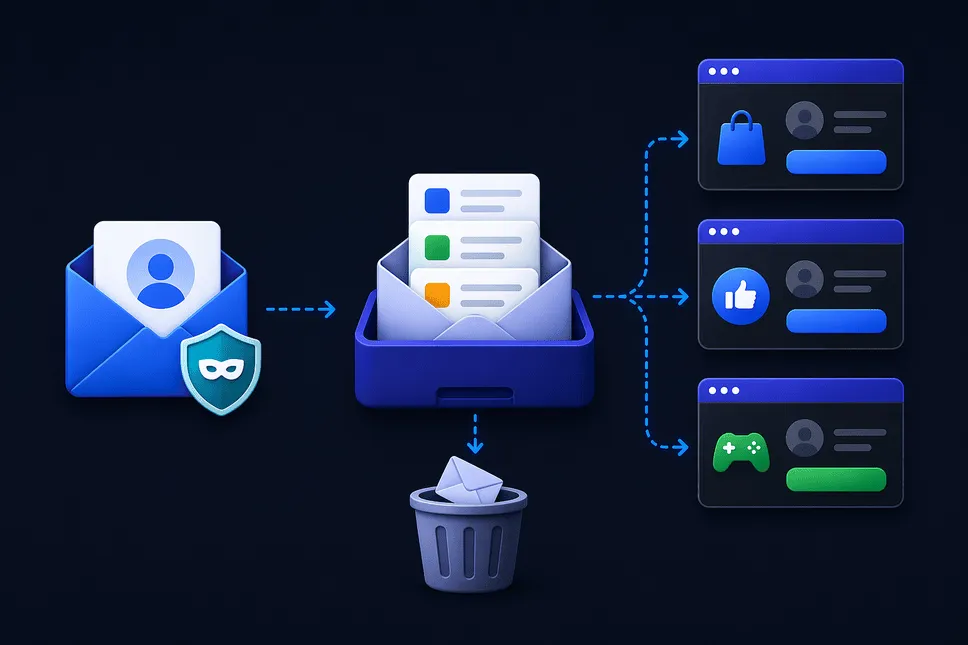
Every time you sign up for a website, download a resource, or try a free trial, you’re asked for one thing—your email address. It seems harmless at first, but over time, this habit leads to an overcrowded inbox filled with spam, promotional emails, and sometimes even security risks.
Your primary email, whether personal or professional - slowly becomes a dumping ground for unwanted messages. Worse, once your email is shared, you have very little control over how it’s used, stored, or even sold.
That’s where disposable mail comes in.
A disposable mail is designed to solve this exact problem. It allows you to receive emails without exposing your real inbox. If you're new, it's worth understanding what is a disposable mail and how it works before diving deeper.
Our service creates short-lived email addresses that automatically expire—keeping your digital identity clean, private, and secure.
But how does this system actually work behind the scenes?
Let’s break it down in a simple, human way.
How Disposable Mail Works (Step-by-Step Explanation)
At its core, disposable mail is built on a simple idea: create a working email address that exists temporarily, receives messages, and then disappears. For a quick overview, you can also explore how disposable email works step by step.
But behind that simplicity is a smart system that handles email routing, storage, and deletion efficiently.
1. Instant Email Creation Using a Disposable Email Generator
When you visit ThrowInbox, the system uses a temporary email generator to instantly create a unique email address for you.
This address might look something like:
user123@kivoxer.com
There’s no signup, no password, and no personal information required.
If you're curious about similar tools, you can try a free random email generator tool to see how instant email creation works.
This is different from traditional email services. Instead of creating a permanent account, you’re simply assigned a temporary identity.
2. Receiving Emails Through the Temporary Email System
Once your disposable email is generated, it is connected to a backend mail server.
When someone sends an email to your temporary address:
- The message is received by the mail server
- The website fetches the mail from the backend
- The email is displayed in your temporary inbox instantly
This process is closely related to how email forwarding works behind the scenes.
3. Real-Time Inbox Display
As soon as an email is received, it appears in your inbox in real time.
Modern disposable mail services support:
- HTML emails
- Attachments
- Verification links
- OTP messages
This makes them perfect for tasks like disposable email for OTP verification without phone number.
4. Temporary Storage and Automatic Deletion
Unlike traditional email, messages are not stored permanently.
After the expiration time:
- The email address is deleted
- All received emails are wiped
- No recovery is possible
This is one of the easiest ways to avoid spam emails permanently and keep your inbox clean.
5. Domain Pool and Address Rotation
To stay functional, disposable email services maintain multiple domains.
For example:
- domain1.com
- domain2.net
- domain3.org
The random email generator assigns addresses from these domains.
Why this matters:
- Some websites block known disposable domains
- Rotating domains ensures continued usability
This is also why services are often referred to as a fake email generator—even though the emails are real and functional.
This helps bypass restrictions where some websites block temporary emails. If you're comparing options, check Disposable email vs Gmail key differences.
6. No Account System (Stateless Design)
Disposable mail systems are often stateless, meaning no accounts or logins are required.
This means:
- No user accounts
- No stored identity
- No login system
Your session is temporary, just like your email.
This is what makes temp mail extremely fast and anonymous.
For similar privacy-focused strategies, you can also explore email aliases for safer online signups.
7. Security and Isolation
Each generated inbox is isolated.
That means:
- Emails sent to your address are not visible to others
- Sessions are unique
- Data is automatically cleared
While not designed for sensitive communication, it’s still useful for everyday privacy. If you're wondering about risks, read is email forwarding safe and secure.
Benefits of Disposable Mail
Now that you understand how it works, let’s talk about why it’s so useful.
1. Protect Your Primary Inbox
Using a temp email keeps your personal inbox free from spam and clutter.
2. Maintain Privacy Online
A throwaway mail ensures your real identity isn’t exposed.
For deeper protection, learn about browser fingerprinting and online privacy protection.
3. Avoid Spam and Promotions
A temporary mail stops marketing emails before they reach your inbox.
You can also learn how to stop email tracking and protect your privacy.
4. Quick and Hassle-Free Access
With a free tempmail generator, you can start using an email instantly—no signup needed.
5. Perfect for One-Time Use
Whether it's downloading a file or verifying an account, disposable mail is ideal.
You can follow how to create a throwaway email address instantly if you're new.
6. Useful for Developers and Testers
A random email generator allows testing multiple accounts and workflows efficiently.
Developers can also benefit from temporary email for developers and testing workflows.
7. Reduce Risk of Data Breaches
If a website gets compromised, your real email remains unaffected.
8. Stay Anonymous
Using a fake email generator helps you stay private online.
This is especially useful for temp email for social media privacy protection.
How to Use a Temporary Mail Service (Step-by-Step)
Step 1: Open ThrowInbox
Visit the throwinbox.com website directly in your browser.
Step 2: Generate a Temporary Email
A temporary email generator will instantly assign you a unique address.
Step 3: Use the Email Anywhere
Copy the generated temp mail and use it for:
- Signups
- Downloads
- Free trials
You can also use it for gaming platforms—see temporary email for gaming accounts on Android and iOS.
Step 4: Receive Emails Instantly
Emails sent to your address will appear in your inbox in real time.
Step 5: Let It Expire
Once done, everything is automatically deleted.
Tips for Using Disposable Mail Effectively
1. Don’t Use for Important Accounts
Avoid using burner mail for banking or business communication.
Instead, consider email forwarding for business communication.
2. Complete Actions Quickly
Temporary emails expire quickly, so act fast.
3. Generate New Emails Frequently
Use a new email each time for better privacy.
4. Avoid Sensitive Information
Temporary email is not designed for confidential communication.
5. Be Aware of Website Restrictions
Some platforms block temp mail domains.
You can compare alternatives in disposable email vs email forwarding comparison.
6. Use for Testing and Exploration
Perfect for developers, marketers, and curious users.
Ready to use throwinbox now
If you’re tired of spam, concerned about privacy, or just want a faster way to access online services, disposable email is the smarter choice.
ThrowInbox gives you instant access to secure, anonymous, and fully functional temporary email addresses—no signup required.
Generate Disposable Email Now and take full control of your inbox—clean, private, and stress-free.
Frequently asked questions
Straightforward answers about safety, OTPs, how long inboxes last, recovery, and legality.
What is disposable mail?
Disposable mail or temp mail is a temporary email address that allows you to receive emails without using your real inbox.
How is temp email different from regular email?
A temp email is short-lived and requires no signup, while regular email is permanent and tied to your identity.
Can I send emails using disposable mail?
Most temp mail services only allow receiving emails.
Is disposable mail safe?
Yes, for general use like signups and verifications. However, avoid sensitive communication.
Why do websites block disposable email?
Some platforms restrict throwaway email to prevent spam or abuse.
How long does a temporary email last?
It depends on the service. Some offer ten minutes mail, while others last longer.
What is a burner email generator?
A burner email generator creates temporary email addresses for short-term use.
Can I reuse a temp email?
No. Once expired, it is permanently deleted.